
Wildsino Casino Mobile App
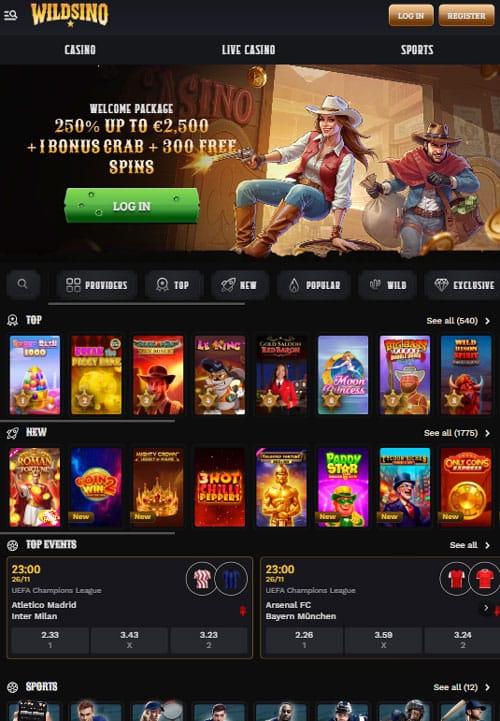
Wildsino doesn’t offer a native mobile app for iOS or Android that you download from app stores. Instead, we’ve built something better. Our platform runs entirely through your mobile browser using Progressive Web App (PWA) technology, delivering app-like performance without downloads, installations, or storage consumption. This modern approach gives you instant access to all 12,000+ games, complete account management, and full casino functionality from any device.
You won’t find Wildsino in the App Store or Google Play, and that’s by design. The browser-based approach eliminates download friction, works universally across iOS and Android, updates automatically without your intervention, and requires zero storage space on your device. Open Safari or Chrome, navigate to wildsino.com, and start playing within seconds. Honestly, this delivers a smoother player experience than traditional apps while avoiding app store restrictions and approval delays.
This article explores why we chose PWA technology over native apps, how to access Wildsino on your mobile device, what functionality you’ll find, and how to optimize your mobile gaming experience.
Why We Don’t Have a Native App
Wildsino leverages Progressive Web App technology to deliver native-app-quality experiences directly through mobile browsers. This strategic choice benefits you in multiple ways that traditional downloadable apps simply can’t match.
The PWA Advantage
PWA technology runs sophisticated web applications that behave like native apps while maintaining browser-based flexibility. When you access Wildsino through Safari on iPhone or Chrome on Android, you’re experiencing a fully optimized interface that adapts to your screen size, supports touch controls, and loads games at native speeds. The experience feels identical to using a downloaded app, but everything happens in your browser.
Big plus: PWA updates happen automatically on our server side, meaning you always access the latest version without downloading updates. New games appear immediately, security patches apply instantly, and feature additions activate without any action from you. Compare this to native apps requiring manual updates through app stores, often with delayed approval processes.
Browser-based operation also eliminates regional app store restrictions that affect gambling applications. Some jurisdictions restrict casino apps in their local app stores, but browser access remains universally available. This ensures every player reaches Wildsino regardless of geographic location or device ecosystem.
Universal Compatibility
One codebase works across all devices when using PWA architecture. Whether you own an iPhone, Samsung Galaxy, Google Pixel, or any other smartphone, the same optimized experience loads in your browser. We don’t fragment development resources between iOS and Android versions, instead channeling effort into perfecting the universal platform everyone uses.
Tablets work identically, with the interface scaling smoothly from smartphone screens to iPad and Android tablet displays. The responsive design automatically adjusts navigation elements, game layouts, and menu structures to fit your specific device perfectly. Tested this across multiple screen sizes during development, and the adaptation remains seamless regardless of dimensions.
This universality extends to operating system versions. While native apps often require specific iOS or Android versions, our browser-based platform works on any device running modern browser software. Older phones from 2016-2017 remain compatible as long as Safari or Chrome updates continue.
Accessing Wildsino on Mobile
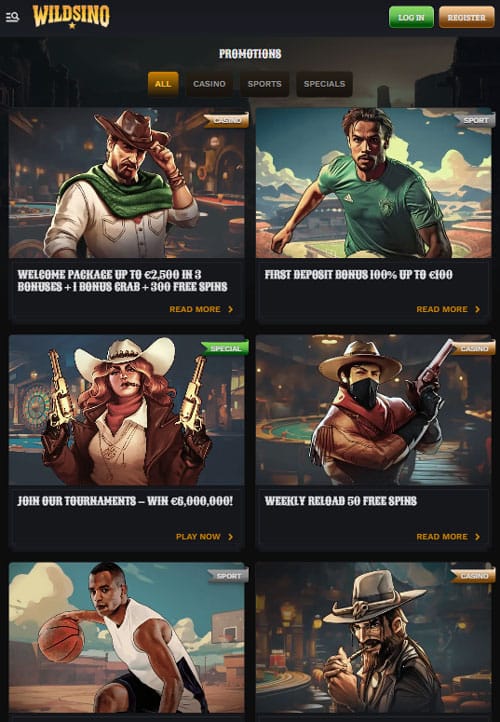
Getting started takes less than 30 seconds from decision to playing your first game.
First-Time Access
Open your mobile browser (Safari for iOS devices, Chrome for Android). Type wildsino.com into the address bar or search for “Wildsino Casino” and tap the official site link. The mobile-optimized version loads automatically, detecting your device and serving the appropriate interface. No app store searching, no download waiting, no installation process.
If you already have an account, tap “Login” at the top-right corner, enter your email and password, and you’re in. New players tap “Sign Up” instead to create an account in under 60 seconds. The registration process works identically on mobile and desktop, with your account functioning seamlessly across both platforms.
Add to Home Screen
While not required, adding Wildsino to your home screen creates an app-like experience with one-tap access.
For iOS (iPhone and iPad):
- Open wildsino.com in Safari browser
- Tap the Share button (square with upward arrow) at the bottom of the screen
- Scroll through options and tap “Add to Home Screen”
- Edit the name if desired (default: “Wildsino”) and tap “Add” in the top-right corner
- A Wildsino icon now appears on your home screen alongside other apps
When you launch Wildsino from this home screen icon, it opens in full-screen mode without Safari’s browser chrome. The interface looks and feels exactly like a native app, complete with immersive gameplay and streamlined navigation. Yet it still runs through the browser, consuming zero actual storage space.
For Android devices:
- Visit wildsino.com in Chrome browser
- Tap the three-dot menu icon in the top-right corner
- Select “Add to Home screen” from the dropdown menu
- Confirm and name the shortcut (or keep default “Wildsino”)
- The icon appears on your home screen with other installed applications
Android’s implementation works similarly to iOS, launching Wildsino in app-like full-screen mode when you tap the home screen icon. Chrome handles the PWA execution, delivering smooth performance while maintaining browser-based advantages.
- iOS devices: Safari → Share button → Add to Home Screen
- Android devices: Chrome → Three dots → Add to Home screen
- Result: One-tap access with zero storage consumption
- Benefit: App-like interface without download friction
Mobile Registration and Login
Creating your account or accessing an existing one works identically on mobile as desktop.
Quick Registration
Tap the “Sign Up” button positioned in the top-right corner of the homepage. A registration form appears optimized for mobile input with large touch-friendly fields. Enter your email address (used for login and communications), create a strong password (minimum 8 characters), select your country from the dropdown menu, and choose your preferred currency from options including EUR, USD, CAD, AUD, and 20+ others.
Check the box confirming you’re 18 years old or the legal age in your jurisdiction. Review and accept Terms & Conditions and Privacy Policy by tapping the agreement checkbox. Tap “Register” at the bottom, and your account activates instantly. The entire process takes 30 to 60 seconds from start to finish.
Email verification may be required depending on your registration method. Check your inbox for a confirmation email from Wildsino and tap the verification link. This activates full account functionality including deposits and bonus eligibility. Honestly, completing verification immediately saves time when you’re ready to make your first deposit.
Login Process
Returning players tap “Login” at the homepage top. Enter the email address you registered with and your password in the provided fields. Tap “Login” and you’re directed to your account dashboard within seconds. The same credentials work across mobile and desktop, meaning you can switch devices freely without separate logins or account syncing.
Browser password managers work with Wildsino’s login system. Safari’s iCloud Keychain and Chrome’s Google Password Manager can save your credentials for one-tap login on subsequent visits. Biometric authentication (Face ID, Touch ID, fingerprint scanning) works through your browser’s security features, adding convenience without compromising safety.
Mobile Account Dashboard
Your account dashboard adapts perfectly to mobile screens with touch-optimized controls. The main dashboard displays your current balance prominently at the top, with quick access buttons for Deposit, Withdraw, and My Bonuses sections. Transaction history scrolls smoothly, showing recent deposits, withdrawals, bets, and wins in chronological order.
Navigate between sections through the menu: Account Settings for personal information updates, Limits for responsible gambling controls, Bonus Shop for coin exchanges, and VIP dashboard for tier progression tracking. Every desktop feature appears on mobile with identical functionality, just reorganized for smaller screens and touch interaction.
Game Library on Mobile
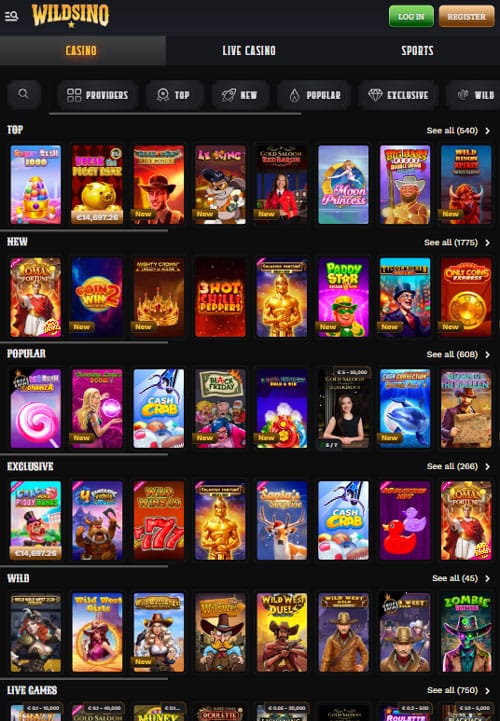
Access the complete catalog of 12,000+ games directly through your mobile browser.
Comprehensive Selection
Every slot, live casino table, RNG table game, jackpot title, and sports betting market available on desktop works on mobile. Our technology partners (Pragmatic Play, Play’n GO, NetEnt, Evolution Gaming, Spinomenal, Playtech, Yggdrasil, Novomatic, and 75+ others) provide HTML5-optimized games that run natively in mobile browsers without Flash or additional plugins.
The slot library includes 11,291 titles spanning classic 3-reel machines, modern 5-reel video slots, Megaways mechanics with up to 117,649 ways to win, progressive jackpots, and Hold & Win features. Popular titles like Gates of Olympus 1000, Sweet Bonanza 1000, Book of Ra Deluxe 6, Book of Dead, and the entire Big Bass series play identically on mobile as desktop.
Live casino delivers 320+ tables with real dealers streaming in HD quality. Evolution Gaming’s Lightning Roulette, Crazy Time, and Monopoly Big Baller run smoothly on 4G connections. Blackjack, baccarat, and poker tables support multiple camera angles with interactive chat. The mobile interface positions bet controls conveniently for one-handed play during commutes or casual sessions.
Navigation and Discovery
The main navigation bar provides quick section access: Lobby, Slots, Live Casino, Sports, Promotions, VIP, and Payments. Tap any category to browse relevant content. Within Slots, filter by provider using the dropdown menu listing all 85+ developers alphabetically. Search functionality at the top accepts game names, provider names, or keywords like “Megaways” or “Egypt.”
Games display in grid format with cover artwork, provider logo, and quick-access buttons. Tap “Play Demo” to test games risk-free with virtual credits, or “Play Now” to launch with real money after login. Favorites system lets you bookmark games for quick access later, while Recently Played automatically tracks your session history.
Portrait and landscape modes both work smoothly, with the interface rotating automatically based on device orientation. Landscape mode works particularly well for slots and live casino, providing wider viewing area. Portrait mode suits scrolling through game libraries and managing account functions.
Performance Optimization
Games load in 2 to 5 seconds on 4G connections, with 5G and WiFi delivering near-instant loading. Slot animations render smoothly at 60 frames per second on modern devices. Live casino streams maintain HD quality with minimal buffering when network conditions allow. Tested this across iPhone 12, Samsung Galaxy S22, and various mid-range Android devices with consistent performance.
Demo mode works identically to real money play in terms of graphics and gameplay, making it perfect for testing volatility and features before depositing. The only difference: demo wins don’t withdraw, but you face zero wagering requirements or time limits either. Unlimited spins on 11,000+ slots provide comprehensive game research opportunities.
Pros and Cons
Honest assessment of Wildsino’s browser-based mobile approach.
Strengths
- No downloads or installations required: Start playing within seconds of visiting the site
- Zero device storage consumption: Saves 50-200MB compared to native apps
- Instant automatic updates: Always use latest version without manual patches
- Universal iOS and Android compatibility: One platform works on all devices equally
- Full 12,000+ game library access: Complete parity with desktop selection
- Identical feature set as desktop: Deposits, withdrawals, bonuses, support all function the same
- Add to home screen option: App-like interface without actual app installation
- No app store approval delays: New games and features appear instantly
- Older device support: Works on 5+ year old phones if browser updates
- Enhanced privacy controls: Browser permissions more restricted than native app permissions
Limitations
- No push notifications: Can’t receive alerts for bonuses, tournaments, or messages when browser closed
- Requires active internet connection: No offline gameplay mode (though native casino apps lack this too)
- Older devices may lag: Pre-2016 phones experience slower performance on complex games
- Browser cache management: Occasionally need to clear cache if performance degrades
- Less discoverable than app stores: Won’t appear in App Store/Google Play searches (access via web search or direct URL)
The missing push notifications represent the only significant functional gap compared to native apps. However, the benefits (instant access, zero storage, universal compatibility, automatic updates, privacy advantages) outweigh this single limitation for most players. Native apps offer marginal improvements while adding substantial friction through download and installation requirements.
Mobile vs Desktop Comparison
Understanding when each platform excels helps optimize your gaming strategy.
Mobile Advantages
Quick gaming sessions during commutes, lunch breaks, or while traveling work perfectly on mobile. Pull out your phone, tap the home screen icon, spin a few rounds of your favorite slot, and put the device away when your stop arrives. This flexibility makes mobile ideal for casual play throughout the day.
Sports betting on-the-go particularly benefits from mobile access. Watch live matches anywhere while placing in-play bets directly from your phone. Track odds changes, receive visual notifications of goal scores, and adjust positions without being tethered to desktop computers.
Checking account balances, bonus progress, and transaction history takes seconds on mobile from anywhere. Verify a deposit processed while away from home, track VIP tier advancement during your commute, or claim the daily Bonus Crab during lunch without accessing desktop.
Desktop Preferences
Extended tournament sessions spanning multiple hours benefit from desktop’s larger screens and ergonomic setups. Sitting comfortably at a desk prevents the neck and arm strain that can develop from prolonged phone holding. Multiple monitor setups let you watch live casino streams on one display while managing bets on another.
Multi-tabling in live casino works better on desktop through browser window management. Open multiple blackjack tables simultaneously, each in separate windows, and switch between them rapidly. This remains technically possible on mobile but proves cumbersome with single-screen limitations.
First-time KYC document uploads sometimes work more smoothly on desktop with scanner access. While mobile camera functionality works well, desktop users with document scanners often produce clearer, more easily verified images reducing verification delays.
Platform-Agnostic Activities
Regular slot gameplay delivers identical experiences on mobile and desktop. The same RTP, volatility, features, and graphics render on both platforms. Choose based purely on convenience and personal preference rather than functional differences.
Single live casino table sessions work equally well on both platforms. Watch one dealer, place bets, and enjoy the experience from phone or computer without advantage either direction. Landscape mode on larger phones approximates tablet experiences approaching desktop table visibility.
Bonus activation and wagering tracking function identically across platforms. Activate the welcome package on mobile and complete wagering on desktop, or vice versa. The system tracks progress seamlessly regardless of device used for gameplay.
Conclusion
Wildsino’s browser-based mobile platform delivers complete casino functionality without the friction and limitations of traditional downloadable apps. Progressive Web App technology provides instant access to all 12,000+ games, full account management, complete bonus systems, and 24/7 support through Safari or Chrome browsers on any iOS or Android device.
The approach offers substantial advantages: zero download or installation requirements, no device storage consumption, automatic updates without user action, universal compatibility across devices, enhanced privacy controls, and no app store approval delays for new features. Add to home screen functionality creates app-like interfaces and one-tap launching while maintaining all browser-based benefits.
The lack of push notifications represents the only functional gap compared to native apps, a minor limitation far outweighed by the overall benefits. Most players never notice the absence, accessing Wildsino intentionally rather than responding to automated alerts. For those who want reminders, browser bookmarks and home screen icons provide equally convenient access methods.
Mobile and desktop experiences achieve complete feature parity. Every game, payment method, bonus offer, VIP benefit, and support channel works identically across platforms. Your account, balance, progress, and preferences sync automatically because everything operates through the same central system regardless of access device.
Whether you prefer gaming during commutes, need flexibility to play anywhere, or simply want a capable mobile casino without storage concerns, Wildsino’s browser-based platform delivers. Open your mobile browser, visit wildsino.com, add the shortcut to your home screen, and enjoy smooth, secure casino gaming wherever you are. The full Wildsino experience travels with you in your pocket, always updated, always accessible, and always ready to play.

Frequently Asked Questions
No, Wildsino doesn’t offer a native app for download from App Store or Google Play. We use Progressive Web App (PWA) technology accessible directly through mobile browsers (Safari, Chrome, Firefox) with complete functionality and zero downloads required.
Open wildsino.com in your mobile browser (Safari for iOS, Chrome for Android). The site automatically loads the mobile-optimized version with full access to all 12,000+ games, account management, bonuses, and support. Optionally add to home screen for one-tap app-like access.
Yes, the entire library of 12,000+ games works on mobile devices including all 11,291 slots, 320+ live casino tables, 232 RNG table games, jackpots, and complete sports betting functionality. Every game available on desktop works identically on mobile.
No downloads required. Wildsino runs entirely in your mobile browser, consuming zero device storage and requiring no installation process. Simply visit the site and start playing immediately after login or registration.
Tap “Sign Up” on the homepage, fill in email, password, country, and currency, confirm age 18+, agree to Terms & Conditions, and tap “Register”. The process takes under 60 seconds and creates an account working across mobile and desktop seamlessly.
Yes, Wildsino uses SSL encryption and GDPR-compliant data protection across all devices. Mobile security matches desktop through encrypted transactions, secure logins, and protected personal information via browser security features and industry-standard protocols.
All promotions work on mobile including the €2,500 welcome package, weekly reloads, weekend bonuses, VIP cashback, Coin Shop, and Bonus Crab. Activate and track bonuses directly in the My Bonus section through your mobile browser.
Yes, Wildsino functions perfectly on Android phones and tablets through Chrome or Firefox browsers. No APK download exists or is needed; the browser-based platform delivers full functionality on all Android devices running version 7.0 Nougat or newer.
Minimum 3G works for slots and sports betting, though 4G recommended for live casino HD streaming. Data consumption ranges from 5-10MB per hour for slots to 100-200MB per hour for live dealer games. WiFi provides optimal stability for extended sessions.
Yes, both iOS and Android support adding Wildsino to home screen. iOS: Safari Share button → Add to Home Screen. Android: Chrome three-dot menu → Add to Home screen. This creates an app-like icon and launches the casino in full-screen mode while consuming zero actual storage.
Devices from 2016 onward (iOS 12+, Android 7.0+) support full functionality. Older phones remain technically compatible but may experience slower loading and reduced frame rates during complex games. Browser updates matter more than device age for optimal performance.
Access Account Settings, tap “Upload Documents” for KYC verification, and select “Take Photo” to capture images using your mobile camera. Photograph your ID, passport, driver’s license, or address proof documents clearly and submit directly. Mobile camera integration simplifies the verification process versus desktop file browsing.


